
Skin Changer
Preview weapon finishes, outfits and knife styles locally in supported titles.
Library
The finish library on this PC
Browse weapon finishes, outfits and knife styles for supported games. Check title coverage first; this is a local display tool.
4 cosmetic rows continue lower on this page.
Overview
Cosmetic choices for your local display
Where the finish is drawn, what stays out of your inventory, and how to check a title before checkout.
Skin Changer provides weapon finishes, character outfits and knife styles in supported games. The library is accessed through a lightweight cosmetic client instead of buying each displayed finish separately.
The change stays on your screen and does not add tradable inventory items. Confirm your exact title before purchasing: the general library listing does not establish ROB RUN compatibility.
Weapon finishes, outfits and knife styles
The library groups these cosmetic categories for supported titles. Choose the appearance available for your game after checking coverage. Cosmetic access is separate from the ROB RUN cheat and from any game inventory purchase.
What the display changes
The client draws the selected appearance locally. It does not transfer an item to your account or create a tradeable asset. Other players are not expected to see the finish, and closing the client removes it.
Check the title and PC first
Ask support for the current supported title and item list. A game patch or Windows update can affect coverage. Use Windows 10 or 11 with HVCI, Core Isolation, TPM and Secure Boot enabled, plus internet and the supplied loader access.
Review cosmetic access at checkout
Current access terms and price appear at checkout. A cosmetic client can still conflict with game rules; a visual change does not remove account risk.
Groups
Cosmetic groups
The library covers these cosmetic categories in supported titles. ROB RUN coverage must be confirmed before purchase.
- Presets for premium weapon finishes
- Presets for character outfits
- Presets for rare knife styles
- Coverage across major titles
- A lightweight client on this PC
- Cosmetic drawing on this screen only
- Monthly and lifetime cosmetic licenses
- Windows 10 and Windows 11 support
When access arrives
Shots, then portal access
Shot notes stay on the left side. The right side covers portal access, then how the menu is set up.
Shots
- Layer A
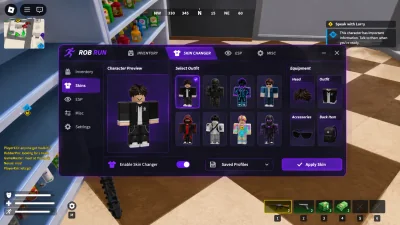
Skin Changer interface illustration
A purple menu presents a character preview, outfit tiles and accessory slots.
More products
Pairs well with
The catalog beside this cosmetic client, with a separate page for each license.
- Rob Run Cheats Role-aware player ESP, loot and base details, aimbot, triggerbot and radar. View details: Rob Run Cheats
- HWID Spoofer A separate hardware utility for identifier changes and trace cleanup. It does not remove an account sanction or establish ROB RUN compatibility. View details: HWID Spoofer
- Cloud DMA Plan for virtualization, Hyper-V and stable broadband. GREENWARD, Static Server and AWS are separate products and are not included. View details: Cloud DMA
FAQ
Questions about this page
Answers for this page. The FAQ page holds the rest.
Blog
Related guides
Read a focused guide for the menu or purchase question you want to resolve.
Check Steam, Windows security, Cloud DMA and separate purchases before choosing a ROB RUN license.