
ROB RUN Cheats for Steam
Choose aim keys, FOV, smoothing, bones and role filters. Add player, loot, vehicle and base information with separate colors and distance limits.
Product Overview
At a glance
Key capabilities
The short list for Rob Run Cheats, before the full module list.
Overview
Information for the run you are planning
How the documented controls and requirements fit your ROB RUN setup.
Read cops, robbers and civilians alongside health, weapons and wanted states. Follow valuable loot, vehicle conditions and base raid timers with adjustable colors, categories and distance limits.
Aimbot, triggerbot and 2D radar complement the visual tools. Configure the controls separately and save profiles for later sessions. This package supports the Steam build on Windows 10 and 11 with the stated security and Cloud DMA requirements.
ROB RUN cheats for a city full of moving threats
Looty Bay mixes police chases, robberies and clan fights. The overlay brings the useful details together: a player’s role and wanted state, an occupied vehicle, a valuable drop or a base under raid. Separate toggles and distance limits let you decide how much of the city stays on screen.
The package is external and built for ROB RUN on Steam. Aim controls, triggerbot and information modules can be configured separately. Saved profiles let you return to the settings you have chosen.
Aimbot: keys, FOV and target selection
Assign an aim key and optional force aim key. Standard assistance and memory/silent aim are available, with an in-scope restriction and a visibility check for targets behind cover. FOV, adaptive FOV, smoothing, humanization and prediction control the aim behavior; an optional prediction cross marks the predicted point.
Select head, neck, chest, pelvis or closest bone. Bone randomization and head hit chance are separate settings. Prioritize targets by proximity or crosshair, limit roles to cops, robbers, civilians or NPCs, and skip dead, knocked or vehicle-bound players as well as teammates and clan members. Maximum distance and switch delay bound target acquisition.
Draw the FOV border, background and locked target independently. Battle mode can hide the FOV circle when you want fewer drawn elements during a fight.
Triggerbot: activation and valid hitboxes
The triggerbot has a separate hold or toggle key. It fires when the crosshair intersects a valid hitbox. Select head, body or legs, adjust hitbox scale, set a reaction delay and apply a maximum trigger distance. Visible-only targeting blocks shots at targets behind cover. The same ignore filters used by the aimbot apply.
Player ESP: roles, equipment and action states
Choose plain or background styling with full, corner, 2D or 3D boxes, fill, skeletons and head circles. Health bars and text, armor or shield, names and clan tags have separate toggles. Police highlighting, role tags and wanted or heat states help distinguish a chase from an ordinary encounter.
Held weapons, shooting, reloading, arrested and downed states add context. Vehicle occupancy, snaplines, off-screen arrows and an aiming-at-you indicator extend the picture. Use different colors for visible and hidden players, fade labels with distance, hide your team, cap range and choose NPC or corpse markers.
Glow and chams
Outline, fill or combined glow styles highlight models. Set a main color and a separate police color, then limit glow distance. Optional material chams are listed as a separate control.
Vehicle ESP: choose the next ride
Read name, distance, owner or free status and locked state. Filter empty or occupied vehicles and police, robber, civilian or unowned roles. Health, fuel, speed, engine and cargo readouts help you assess a vehicle before approaching. Use 2D or 3D boxes, garage and spawn markers, and hide your own vehicle.
World and loot ESP: filter the money trail
Show dropped cash and items with icons and prices, plus bags, containers, cargo, safes and workbenches. Filter weapons, ammunition, armor, medicine, keys, tools and valuables. A minimum value filter and maximum world distance keep low-value or distant labels from filling the screen.
Hideout entrances, territory and capture points, heist objectives, vendors and traders can be marked. Keep the categories relevant to your route rather than displaying every marker at once.
Cameras, banks and player bases
Security camera markers include broken or disabled states and coverage cones. Guard posts, alarms, panels, doors, vault doors and medical cabinets show the hardware around an entry. Banks, roulette spots, cash nodes, withdrawal and charging points, and ATMs cover the money locations.
Base ESP identifies owner and clan, buildings, raid state and lock timer. Defense blocks and modules, workbench timers, laundering stations, cargo opening and crypto farms add detail for clan activity. Hide your own base when those labels are unnecessary.
2D radar and battle mode
Set rings, FOV cone, range, size and zoom, including auto zoom. Select players, vehicles, loot, cameras, hideouts, objectives and banks, with map markers, off-screen indicators and a player list.
Battle mode has its own key. It strips world labels, can leave enemies only and can filter by clan battle side. Use it to reduce visual clutter without rebuilding a full configuration during combat.
Other controls and saved profiles
No recoil, soft no spread, a custom crosshair and a stream-proof overlay are included. Assign menu and panic keys, then save or load configuration profiles. Check a local recording with your actual capture setup before relying on the stream-proof option.
Windows, Steam and Cloud DMA requirements
Use the Steam version on Windows 10 or 11. HVCI, Core Isolation, TPM and Secure Boot must be enabled. Cloud DMA is required for full functionality on supported builds. Its environment needs CPU virtualization enabled in firmware, the Hyper-V role, at least 8 GB of RAM and stable broadband; 16 GB is recommended.
Separate products before checkout
GREENWARD, Static Server and AWS are not included with the cheat. Static Server and AWS are distinct purchases. AWS is a regional routing service used in Cloud DMA workflows. Read the delivery requirements and confirm your setup with support before paying.
Delivery, updates and access
A loader is supplied after purchase. Follow the delivered setup instructions rather than an assumed launch order. Early Access patches can require updated builds, and compatibility or detection status is never a permanent promise.
Use the FAQ for concise purchase answers or the setup guide for a preparation checklist. Current prices and access choices appear at external checkout.
Modules
What's included
The modules and adjustable settings included with Rob Run Cheats.
- Aim key and optional force aim key
- Standard and memory/silent aim
- FOV, adaptive FOV, smoothing and humanization
- Prediction and optional prediction cross
- Head, neck, chest, pelvis or closest bone
- Bone randomizer and head hit chance
- Closest or crosshair priority and role filters
- Dead, knocked, vehicle, teammate and clan filters
- Aim distance and target switch delay
- Independent FOV and locked-target drawing
- Trigger key, hold/toggle and reaction delay
- Head, body or leg hitboxes and hitbox scale
- Visible-only and trigger distance controls
- Player boxes, fill, skeletons and head circles
- Health, armor, names, clans and role tags
- Police highlight, wanted and heat states
- Held item, action state and vehicle occupancy
- Snaplines, off-screen and aiming-at-you indicators
- Visible/hidden colors, distance fade and team hiding
- Outline/fill glow, police color and material chams
- Vehicle ownership, lock, health, fuel and cargo
- Loot icons, prices, category and minimum value filters
- Cameras, coverage cones and security hardware
- Bank, roulette, cash and ATM markers
- Base ownership, raid state, lock and workbench timers
- 2D radar with rings, FOV cone and auto zoom
- Battle mode and clan-side filtering
- No recoil, soft no spread and custom crosshair
- Stream-proof overlay, menu and panic keys
- Save and load configuration profiles
Experience
Read the modules · Prepare your setup
Feature notes explain the controls in this package. Setup guidance covers the Windows checks and the loader supplied after purchase.
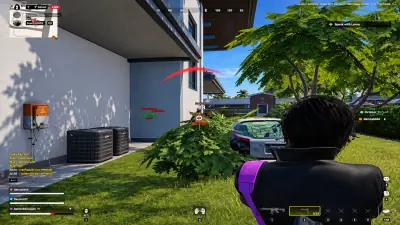
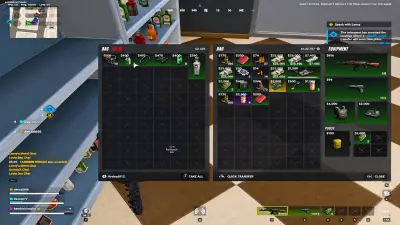
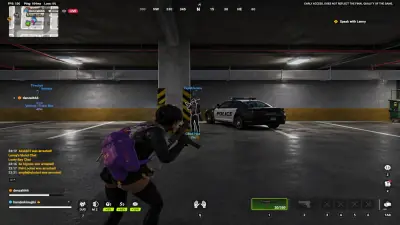
In-game layers
- Layer A
Suburban encounter
A house, hedges and a parked car frame a third-person encounter with player labels.
- Layer B
Supermarket inventory
Bag and equipment panels show carried items and values alongside the supermarket shelves.
- Layer C
Police garage
An outlined figure stands beside a police car, with player and vehicle labels across the garage.
More products
Pairs well with
Utilities sold beside the cheat. Each one keeps a separate page.
- HWID Spoofer A separate hardware utility for identifier changes and trace cleanup. It does not remove an account sanction or establish ROB RUN compatibility. View details: HWID Spoofer
- Cloud DMA Plan for virtualization, Hyper-V and stable broadband. GREENWARD, Static Server and AWS are separate products and are not included. View details: Cloud DMA
- Skin Changer The cosmetic client changes what appears on your screen. It does not add tradable items; ask support to confirm your title before ordering. View details: Skin Changer
FAQ
Questions about this page
Answers for this page. The FAQ page holds the rest.
Blog
Related guides
Read a focused guide for the menu or purchase question you want to resolve.
Check Steam, Windows security, Cloud DMA and separate purchases before choosing a ROB RUN license.
Understand keys, FOV, smoothing, bones, role filters and trigger hitboxes without borrowing settings from another game.
Use roles, loot values, camera cones, vehicle condition and base timers while keeping the display manageable.