Player ESP
Know who is nearby.
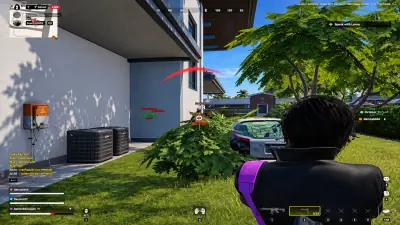
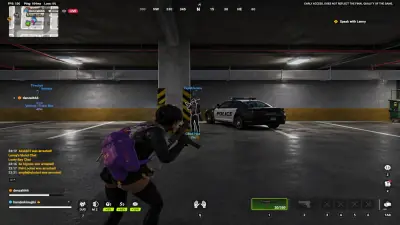
Separate cops, robbers, civilians and NPCs. Read health, armor, weapons and wanted states before deciding where to go.
- Role and clan tags
- Wanted and heat states
- Health and armor
- Action states
- Off-screen arrows
Read the city before you move. Spot police, wanted players, valuable loot and base raid timers. Set your aim controls for the fights you choose.

Role
Player ESP
2D
Radar
Steam
PC build
Saved
Profiles
Features
ROB RUN cheats bring role tags, security details and aim controls into one adjustable menu. Keep the information you need for a heist, escape or clan fight.
Know who is nearby.
Separate cops, robbers, civilians and NPCs. Read health, armor, weapons and wanted states before deciding where to go.
Find what is worth the trip.
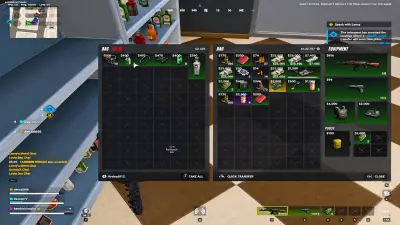
Mark dropped cash, loot bags, safes and containers. Filter item categories and set a minimum value to cut down on clutter.
Choose how aim responds.
Set the aim key, FOV, smoothing and target bone. Role filters and visibility checks narrow the targets it can follow.
Recoil and crosshair options.
No recoil and soft no spread sit alongside a custom crosshair. Keep these separate from your target selection settings.
Keep the wider area in view.
Use rings, range and zoom to track selected categories. Add vehicles, cameras or banks when planning a route.
Fire on a valid hitbox.
Use a dedicated hold or toggle key. Choose hitboxes, add a reaction delay and cap the trigger distance.
Keep capture settings in mind.
The overlay includes a stream-proof option. Check a local recording with your capture setup before going live.
Read the next escape or raid.
Check vehicle locks, fuel and occupancy. Base markers show owner, clan, raid state and lock timers.
Clear space during a fight.
Use a dedicated key to strip world labels. Keep enemies only or filter by clan battle side.
Store
Start with the ROB RUN package, then check the separate utilities and delivery requirements. Each product has its own license and checkout.
Player and world information, configurable aim, triggerbot and 2D radar in one package.
Track police and wanted players, filter loot by value and read base raid timers. Adjust aim and display controls for each run.
Refresh disk, MAC and GPU identifiers with the included trace cleaner. Confirm your title and hardware before purchase.
A separate hardware utility for identifier changes and trace cleanup. It does not remove an account sanction or establish ROB RUN compatibility.
The Cloud DMA delivery layer uses Hyper-V on one Windows PC.
Plan for virtualization, Hyper-V and stable broadband. GREENWARD, Static Server and AWS are separate products and are not included.
Preview weapon finishes, outfits and knife styles locally in supported titles.
The cosmetic client changes what appears on your screen. It does not add tradable items; ask support to confirm your title before ordering.
Why us
Choose what appears on screen and which targets aim can follow. The comparison highlights the documented controls in this package; availability elsewhere varies.
Role-aware player information
Separate police, criminals, civilians and NPCs, with wanted states and held weapons visible in the overlay.
Detailed aim filters
Choose bones, role targets, visibility checks and distance limits. Skip teammates, clan members and knocked players.
Heist and security markers
Read camera coverage, alarms, security panels and vault doors alongside banks and cash points.
Base and vehicle details
Show raid lock timers, defense modules and workbench timers. Check vehicle fuel, locks and occupancy.
Combat display controls
Battle mode removes world labels and can retain enemies only. Per-category distance limits keep the wider overlay readable.
Reusable configuration profiles
Save and load settings, with separate keys for aim, triggerbot, battle mode, menu access and panic.
4
Target role groups
Cops, robbers, civilians and NPCs can be selected separately.
2D
Configurable radar
Set range, rings, zoom and the categories you want to follow.
Per module
Display control
Toggle modules and adjust their available filters, colors and distances.
Setup guide
A loader is supplied after purchase. Check Windows security and the separate Cloud DMA requirements before ordering; use the delivered instructions for the install sequence.
Check the platform
Prepare Cloud DMA
Follow the delivered instructions
How it works
Check the requirements and delivery terms before configuring the package.
4 preparation steps
Check Steam and Windows
Confirm the current Steam client and Windows security settings. Patches can require an updated build.
Review separate purchases
Cloud DMA is required for full functionality on supported builds. Its related products have separate checkout terms.
Use the supplied loader guide
Follow the instructions delivered after purchase. Ask support if your Windows configuration or a step is unclear.
Set keys and save a profile
Choose role filters and distance limits, assign the activation keys, and save your configuration for later.
Blog
Practical guides to ROB RUN aim filters, information overlays and the requirements to check before purchase.
Check Steam, Windows security, Cloud DMA and separate purchases before choosing a ROB RUN license.
Understand keys, FOV, smoothing, bones, role filters and trigger hitboxes without borrowing settings from another game.
Use roles, loot values, camera cones, vehicle condition and base timers while keeping the display manageable.
FAQ
Answers for this page. The FAQ page holds the rest.